Experience API
The Experience APIs, also referred to as Configuration APIs, are a suite of purpose-built APIs designed to retrieve zero-party data configurations, enabling highly personalized and relevant customer experiences.
With built-in localization support and flexible query parameters, these APIs allow you to fetch tailored consent, preference, and other zero-party data configurations, giving you complete control over customer experiences, from granular, micro-level interactions to full-scale preference centers and everything in between.
These API's are classified as follows:
- Profile Configuration
- Preference Configuration
Building Preference and Consent Collection Experiences Made Easy!
Experience APIs helps you drive the display of relevant consents, preference communications, feedback choices, and other data collection points. They are used in conjunction with Data APIs that retrieve the most up-to-date information of the individual and populate it across them.
Whether you are building a Preference Center or an in-app widget to collect feedback, the user interface layout is up to your imagination.
For displaying preference communications, there are several APIs that you can leverage depending on your use case. For example, to display preference communications based on a specific data point you know about an individual or if they belong to a sepcific segment, leverage the GET ProgramGroups by Custom Properties API. It will return all preference communications, their associated frequency choices and preference attributes, all in one single call.
Check out the video on configuring Program Groups in MyPreferences.
To display consents, use the GET Consents API to retrieve the list of all configured consents. Consents associated with contacts are always returned when you retrieve the Contact Types.
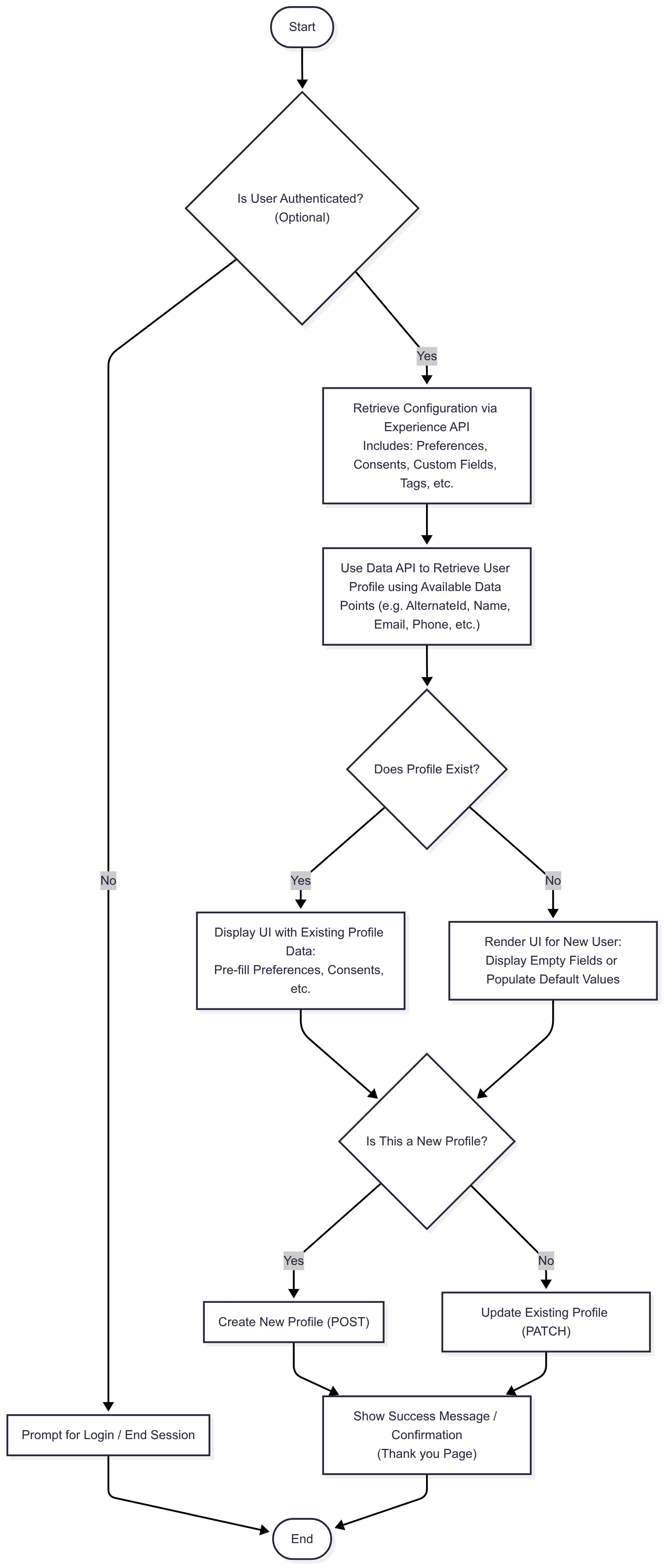
Once the required configuration data is returned, link it to the actual user by retrieving their profile. Use any known data point to look up the user, but for the most accurate match, it’s best to use the Profile ID or Alternate ID.
Creating a personalized and intuitive Preference Center is key to delivering a great user experience and ensuring compliance with evolving data privacy standards. Whether you're building a dedicated Preference Center or embedding feedback and consent collection within your app, Experience APIs play a central role in enabling flexibility, consistency, and accuracy.
Step 1: Design the Layout — Your UI, Your Way The visual layout and interaction model of your Preference Center is entirely customizable. Whether you're building a fully branded standalone preference center or embedding modular components within an app or website, you have complete creative freedom. The APIs provide the data and structure; the rest is up to your design vision and UX strategy.
Step 2: Displaying Preference Communications To display relevant preference communication options, you’ll want to tailor content based on what you know about the user.
Use the GET ProgramGroups by Custom Properties API to retrieve preference communications based on specific data points (e.g., user interests, region, or journey stage) you know about the individual. This allows you to surface only those categories of preference communications that are applicable to that individual, offering a more contextualized and relevant experience.
There are several APIs available that return preference communications, including their frequency and related attributes. You can choose the one that best fits your needs.
The Programs API return one or more programs whereas the Program Groups API returns a specific category of programs.
Step 3: Displaying Consents To display and manage user consents:
Use the GET Consents API to retrieve a list of all available consents configured in your system. Consents associated with the contact types are returned when you retrieve the relevant contact types.
Consents already associated with a user are automatically returned when you retrieve the user's profile.
This enables a clear view of which consents are required, optional, or already completed, empowering users to make informed choices.
Step 4: Display any additional data points
You can display any additional data points you wish to collect, such as Groups, Custom Fields, Tags, and more. These data points help you better understand your users and tailor communications based on their preferences.
Step 5: Merge Configuration Data with User Profile Once you've retrieved all configuration data (e.g., available consents, preferences, custom fields, etc.), you need to merge that with the individual’s profile data to create a personalized experience.
To retrieve the profile, use the GET Profile by ID endpoint or retrieve the profile using alternate identifiers such as an Alternate Id, email address, phone number, or any other known data point.
This step ensures that you're populating the UI with data that's both current and specific to the user, enabling real-time personalization. It also allows the user to correct the course by reviewing and reaffirming the consents, permissions, and preferences they've previously set, ensuring transparency and trust while keeping the experience aligned with their expectations.
By combining Experience APIs for front-end display and Data APIs for profile-level accuracy, you can build a Preference Center that is not only flexible and compliant but also engaging and user-first. This modular architecture enables you to scale and evolve your interface as your data strategy and user expectations grow.
Sample User Preference Center Flow – Profile Identification & UI Handling
What made this section unhelpful for you?


Endpoints
What made this section unhelpful for you?